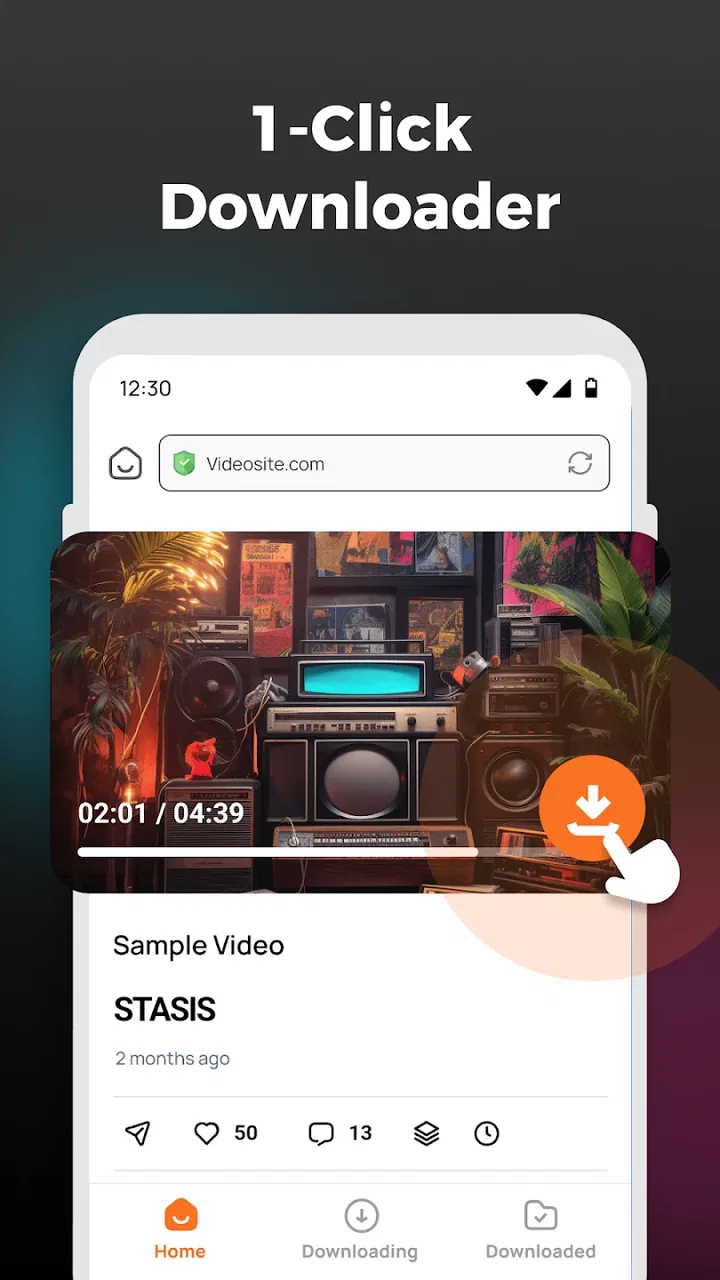
HD Video Downloader
- 4.1
- Rating
- 1.00M
- Installs
- Free
- Price

 Analysis by App-foxy
When a video downloader is used on a shared phone or tablet, the important question is not only whether it saves a clip quickly. It is also whether everyone using that device understands what is being downloaded, where it will appear, and how much storage it may consume. I tested HD Video Downloader with that everyday situation in mind. It is a free Android app from Grow More apps, placed in the video players and editors category, and its appeal is easy to understand: it aims to make downloading video a straightforward task rather than turning it into a complicated editing project.
The app is currently at version 1.6 and works with Android 7.0 or later. Its age classification is Everyone, which makes it broadly suitable for a household device from an app-store perspective. That label should not be confused with a guarantee that every video a person may find or save is suitable for every member of a family. The app itself is a tool, and the source, subject, and intended use of each video still matter.
In my experience, HD Video Downloader is best understood as a practical utility for people who occasionally need an offline copy of a video they are allowed to save. It is less compelling for someone who wants a full media library, advanced file management, or a polished streaming replacement. That distinction becomes especially important when several people share one device.
You May Also Like

 Blood Strike: 2.5 Anniversary
Blood Strike’s Loadouts Turn Every Drop Into a Tactical Gamble
A close look at Blood Strike’s custom loadouts: how fast access to signature weapons reshapes its battle royale rhythm, rewards preparation, and narrows the gap between fights.

 Pandora - Music & Podcasts
Pandora’s Music Is Easy to Start, but Harder to Recover
Pandora’s strength is its low-effort path from a seed to a station. Its weak spot is how much confidence it asks you to place in connection, setup, and quiet recovery.

 8 Ball Pool
 Is Built on Rivalries, Rematches, and Routine
A close look at the rivalries, rematches, shared routines, and unanswered safety questions that turn a quick pool match into a persistent mobile community.

 Samsung Music
’s Quiet Strength Is Playing What You Already Own
Its reach comes less from spectacle than from dependable access to a personal library. That simplicity is both the app’s strongest retention engine and its ceiling.

 AccuWeather: Weather Radar
AccuWeather Review: A Quick, Clear Forecast for Everyday Decisions
For everyday plans, the best forecast is the one you can understand quickly. AccuWeather makes rain timing, radar, and local conditions easy to act on, with a few trade-offs.

 Hill Climb Racing
Why Hill Climb Racing Still Turns Crashes Into One More Run
A tiny car, a bumpy hill and one more upgrade: Hill Climb Racing keeps resurfacing because its simple chaos makes every near-miss feel personal.
More From Our News Desk



How it fits into a shared household device
Imagine a family tablet used in the kitchen, a bedroom, and the car. One person wants to save a tutorial for a place with unreliable internet. Another wants a short clip available during a trip. A child may simply open the video folder later and see files downloaded by someone else. In that setting, the value of HD Video Downloader is its focused purpose: it can sit alongside the device’s normal video tools without trying to become the center of the whole household’s entertainment system.
I would use it for clearly named, occasional downloads rather than allowing the download folder to become a dumping ground. Before saving anything, I would agree with other users about what the device is for and which videos belong on it. That small conversation prevents a common shared-device problem: nobody knows who downloaded a file, why it was needed, or whether it can be deleted.
The app’s free price makes trying it relatively easy, although in-app purchases range from around one dollar to around ten dollars per item. I would not treat those purchases as part of the basic household setup without first checking what is being offered on the device. For a family member who only needs a few offline videos, the free experience may be enough. Someone who encounters a purchase prompt should ask the device owner before continuing, especially if the tablet is used by children.
There is also a useful distinction between downloading and owning content. Saving a video for offline viewing does not automatically grant permission to redistribute it, edit it, or keep it indefinitely. I found that this is worth explaining to younger users in simple terms: use the app for material you have permission to save, and do not forward someone else’s work just because it is now stored locally.
What the first setup should establish
HD Video Downloader does not replace household rules. I would begin by deciding who is allowed to start downloads, whether the app is intended for one person or everyone, and where completed files should be kept. On a shared Android device, those boundaries are often more useful than a long list of technical settings because they reduce confusion before it starts.
A second practical step is to check available storage before saving large or high-quality videos. The store’s short description highlights HD video, and higher-quality files generally deserve more planning than a quick low-resolution clip. I would avoid downloading several versions of the same video simply because the names look slightly different. Keeping one clearly labeled copy is easier for everyone and reduces wasted space.
File naming is another small but valuable habit. If the app or the device allows the saved file to be renamed, I would use a pattern such as subject, date, and intended viewer. If renaming is not convenient, I would at least review the folder after downloading and remove duplicates. This is not glamorous, but it is the difference between a useful offline collection and a folder nobody trusts.
I would also test one download before handing the device to another family member. That check answers practical questions that a store summary cannot: where the file appears, whether the device’s normal video player opens it, and whether the result is easy to find later. A short test clip is safer than discovering during a journey that the saved material is difficult to access.
Keeping accounts and responsibilities separate
Shared hardware does not necessarily mean shared online identity. I would not assume that installing this downloader gives every household member a separate profile, private history, or personal storage area. If the device has multiple user accounts, those should be handled through Android’s own account features rather than expecting the downloader to create boundaries that are not part of its stated role.
This matters when an adult and a child use the same tablet. The adult may be responsible for deciding which sources are appropriate and which files can remain on the device. A child may only need access to already approved videos. Keeping those responsibilities clear is safer than giving every user unrestricted control and trying to sort out the results afterward.
For a shared phone, I would avoid saving sensitive personal material alongside ordinary household videos. A downloader folder can easily become visible to anyone browsing the gallery or file manager. If a video is private, it belongs in a storage arrangement designed for privacy, not simply in a general-purpose download location. HD Video Downloader is useful for access, but I would not mistake it for a secure vault.
The same principle applies to notifications and interruptions. If one person starts a long download while another is using the device, the process may affect battery, mobile data, or attention. I would coordinate downloads over Wi-Fi when possible and avoid starting them immediately before someone needs the tablet for navigation, a call, or schoolwork. These are simple routines, but they make a lightweight tool behave much better in a busy home.
Everyday use: preparing a video for a trip
A realistic example is a parent preparing a few approved educational videos before a train journey. I would first confirm that the videos can legally be downloaded, then save one at a time, check the resulting files, and play them before leaving. That last step is important: an offline plan is only useful if the videos open correctly when the connection is unavailable.
After checking playback, I would place the tablet in its usual viewing setup and make sure the files are easy for the child to find without searching through unrelated material. If several people will use the device, I would create a simple verbal rule: watch the prepared items first, do not start new downloads during the trip, and ask before deleting anything. The app supports the download part of that workflow, while the household supplies the coordination.
For an adult using the same scenario, the advantage is convenience. A recipe, lesson, repair demonstration, or language exercise can be prepared in advance instead of relying on a weak signal at the destination. The trade-off is that downloaded material can become outdated. A tutorial may change, a news clip may lose relevance, and a temporary reference may no longer be needed. I would review the folder after the trip rather than treating every saved file as permanent.
One of my more useful habits with this kind of app is to download only what I expect to use soon. It is tempting to build a large offline archive, but that makes it harder to identify duplicates and increases the chance that old material occupies the device. A small, labeled queue is more practical for a household than an enormous collection nobody maintains.
Quality, storage, and the meaning of HD
The promise of HD video is attractive when a clip contains text, demonstrations, or fine visual detail. However, the highest available quality is not automatically the best choice for every shared device. On a small phone screen, a more modest file may be perfectly watchable and easier to store. On a tablet used for diagrams or subtitles, preserving detail may be worth the extra space.
I would make that decision based on the viewer and the situation, not by selecting the largest option every time. A child watching a simple story in the car may not need the same quality as someone studying a craft demonstration. A family with limited storage should be especially selective. The useful trade-off is not “best quality versus bad quality”; it is clarity versus convenience, with the right balance changing from one video to another.
Another overlooked issue is duplicate content. The same clip may be saved once from a different page, under a slightly different filename, or at two quality levels. After a few weeks, those duplicates can be difficult to distinguish. I recommend opening files before deleting them, because a short title may hide an important difference such as language, subtitles, or a different section of a longer video.
Playback is also part of the experience. If a saved file does not open in the device’s regular player, I would try a compatible video player already trusted on the device rather than immediately downloading several additional apps. Every extra app adds clutter and may confuse younger users. HD Video Downloader works best as one step in a clean workflow, not as an excuse to install an entire collection of tools.
Age, trust, and responsible use
The Everyone age rating is reassuring for general availability, but a family should still consider the actual source material. A downloader can make content available offline, which means a child may encounter it later without the context or supervision that existed when an adult selected it. For that reason, I would prepare children’s videos myself or review them with the child before placing them in a shared folder.
I would also explain that a download is not a private conversation. Other people using the device may see the title, thumbnail, or file. That is particularly relevant when a teenager and a parent share a phone. Clear expectations about personal material, schoolwork, and entertainment reduce accidental exposure and arguments over who may delete what.
Trust works both ways. Adults should not assume that every unfamiliar file was created by a child, and children should not be blamed for a download they did not start. A simple naming convention or a shared note about planned downloads can make responsibility visible. The app does not need to provide elaborate family features for this to work; the household can create a lightweight system around it.
I would skip this app for a child’s completely unsupervised device if the main goal is automated filtering, private profiles, or detailed parental management. A downloader is not the right category of product for those needs. I would also look elsewhere if the user expects a subscription-style service with synchronized watch lists, cloud history, or seamless continuation across several devices. Those are different priorities from saving a local video.
How it compares with the usual alternatives
The most obvious alternative is the official offline feature inside a streaming service. That option is often better for people who want a curated catalog, account-based recommendations, and a controlled way to watch content without a connection. It may also keep offline items inside the service rather than exposing ordinary files in the device’s storage. For a household already committed to one platform, its built-in tools can feel more organized.
HD Video Downloader is more appealing when the user needs a simple local file workflow and does not want a full streaming subscription to solve a small problem. Local files can be easier to move into a normal video library and may remain useful outside one particular app, depending on the source and format. The downside is that the user takes on more responsibility for naming, storage, permissions, and cleanup.
A browser-based downloader may seem quicker because it avoids installing an app, but I generally prefer a dedicated tool for repeated tasks on a shared device. A browser can leave tabs, downloads, and confusing prompts behind. On the other hand, a browser may be the better choice for a one-time task if the user does not want another app occupying space. The decision depends on frequency and trust, not just speed.
Advanced desktop download managers are stronger for people who need queues, detailed file control, batch organization, or a larger archive. They are excessive for a family member who wants to prepare a few videos on an Android phone. HD Video Downloader’s value is its narrower focus. I would choose it for occasional mobile use, but not as the main tool for a serious media collection.
Editors and screen-recording apps solve different problems. An editor is preferable when the goal is trimming, combining, captioning, or improving a video. A screen recorder may help with content that is permitted to be captured but is not offered as a downloadable file. Neither alternative is automatically better, and each introduces its own quality or rights considerations. The strength of this app is that it starts with downloading rather than editing.
What the rating and adoption suggest
HD Video Downloader has an average rating of 4.1 from around one thousand ratings, and it has passed one million installs. I see that as a sign of meaningful interest rather than proof that it will suit every phone or household. Ratings can reflect very different expectations: one person may value a quick save, while another may want advanced organization or broad format support.
The app comes from Grow More apps and is offered free, which lowers the barrier to testing it for a specific task. I would still judge it by a short, controlled trial: install it on the intended device, save one permitted video, confirm playback, and inspect where the file is stored. That process gives a family more useful information than relying on the number shown beside the stars.
The release date is Sep 29, 2025, so I would pay attention to how well the current version fits the device and the user’s routine rather than assuming long-established behavior. Version 1.6 is the version I reviewed. Keeping the app updated through the normal store process is sensible, especially if a source changes how its videos are delivered, but I would not update blindly on a device where storage and mobile data are tightly managed.
Where the app works and where I would pass
I would recommend HD Video Downloader to an adult who wants a focused way to prepare permitted videos for offline use, particularly on an Android phone or tablet shared by several people. It can also suit a student, traveler, or hobbyist who prefers a small local collection over a complicated media-management setup. Its free entry point makes a cautious trial reasonable.
I would pass on it when the real need is family account separation, strong content supervision, automatic synchronization, or a professional download archive. I would also avoid making it the default tool for children who are expected to discover content independently. The Everyone rating describes broad age suitability for the app, not a replacement for an adult’s judgment about the videos being saved.
My biggest practical recommendation is to treat each download as a small household task: confirm permission, choose an appropriate quality, save only what is needed, test playback, label the file, and remove it when its purpose is finished. That workflow addresses the main weaknesses of local downloading without demanding advanced technical knowledge.
It is also worth agreeing on who can use in-app purchases. Because individual purchases can reach around ten dollars, I would keep purchasing decisions with the device owner and avoid handing the phone to a child while a payment prompt is open. This is a basic account boundary, but it prevents an otherwise simple utility from becoming a source of unexpected spending.
My household verdict
After using it as a practical downloader rather than expecting it to be a complete media platform, I found HD Video Downloader easiest to appreciate in short, defined sessions. It helps prepare local viewing, but it does not remove the need to manage files, respect content rights, or coordinate with other people who use the same device.
My recommendation is simple: choose it when you want a focused offline-video helper, not a family-management system or a full streaming replacement. For a shared tablet, I would pair it with clear rules, adult review of children’s material, sensible storage cleanup, and a test download before an important journey. Used that way, the app can be convenient without creating unnecessary confusion.
For my own household shortlist, I would keep it available for occasional permitted downloads and remove it if the device’s needs changed toward private profiles, synchronized libraries, or advanced editing. That is the honest position: HD Video Downloader is useful because it stays focused, but that same focus means it should be judged as a downloader and nothing more.
FAQs for HD Video Downloader
01What features does HD Video Downloader offer?
HD Video Downloader provides a range of features including high-speed downloads, support for multiple video formats, and the ability to download videos from various popular platforms. It also includes a built-in video player and the option to manage and organize downloaded content easily on your device.
02Is HD Video Downloader safe to use?
Yes, HD Video Downloader is designed with user security in mind. It does not collect personal data or compromise your device’s security. However, it’s crucial to download the app from the official store or a trusted source to avoid any potential malware or fake versions.
03Can HD Video Downloader download content from all websites?
While HD Video Downloader supports a wide range of popular video-sharing platforms, it may not work with every website due to varying privacy policies and restrictions. Always ensure you comply with each platform’s terms of service when downloading content.
04Does HD Video Downloader support offline viewing?
Yes, HD Video Downloader allows you to save videos for offline viewing. This feature is particularly useful for users who want to watch content without an active internet connection, making it ideal for travel or areas with limited connectivity.
05Are there any in-app purchases or ads?
HD Video Downloader is typically free to download, but it may include ads to support development costs. Some features might require in-app purchases, such as ad removal or access to premium functionalities, providing a more enhanced user experience.
Pros
- Fast download speeds for all video formats.
- Supports a wide range of video platforms.
- User-friendly interface with intuitive controls.
- Allows batch downloading of multiple videos.
- Includes built-in video player for previews.
Cons
- Contains ads that can be intrusive.
- Limited support for certain website formats.
- Requires permissions that may be concerning.
- No integrated video editing features.
- May not support 4K video downloads.

HD Video Downloader
Gallery